

Whether you’re just getting into 3D printing or you’ve been at it for years and want an upgrade, Amazon in 2026 has more solid options than ever — and more confusing marketing to sift through. Prices have dropped, speeds have gone up, and multi-color printing has gone from a “wow” feature to something you can get for under $400.
Here’s a no-nonsense breakdown of the three best 3D printers you can grab on Amazon right now, depending on what you actually need.
1. Bambu Lab A1 Combo — Best Overall
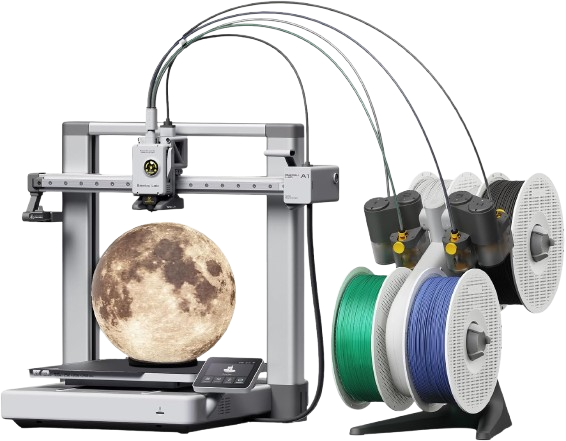
Who it’s for: Anyone who wants the best all-around experience without going premium
If you only read one entry on this list, make it this one. The Bambu Lab A1 Combo has become the go-to recommendation in 2026 for a reason: it bundles the A1 printer with the AMS Lite (Automatic Material System Lite), giving you out-of-the-box 4-color printing capability at a price point that would have been unthinkable two years ago.
The A1 prints up to 500mm/s, handles full auto-calibration (no manual bed leveling, ever), and features a clever quick-swap nozzle system so maintenance doesn’t turn into a half-hour headache. The build volume is a generous 256 x 256 x 256mm, which covers the vast majority of home and hobby projects.
The AMS Lite that comes with the Combo uses an open spool design, so you can use standard third-party filament without any modification — a nice touch that saves you money over time. The catch? No active humidity control, so moisture-sensitive materials like Nylon should be pre-dried before a run.
At around $399, there’s nothing in this bracket that touches it for ease of use, reliability, and multi-color capability all in one box.
The bottom line: Zero setup fuss, multi-color printing, and a rock-solid reputation. The A1 Combo is the printer most people should buy in 2026.
2. Flashforge Adventurer 5M — Best Under $300
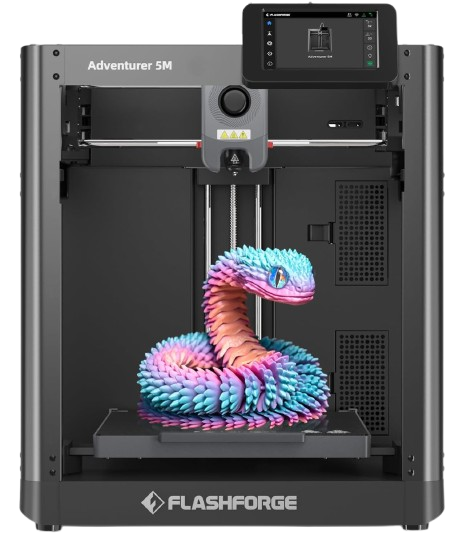
Who it’s for: Beginners and hobbyists who want fast, reliable prints without the bells and whistles
The Flashforge Adventurer 5M hits a really satisfying sweet spot. At around $259, it runs a CoreXY motion system capable of 600mm/s travel speeds and 20,000mm/s² acceleration — numbers that sound wild and, in practice, genuinely cut print times dramatically compared to older budget machines.
It’s fully enclosed, which matters more than people realize: enclosed printers maintain more consistent temperatures, reduce warping on tricky prints, and keep fumes contained. The 3-second nozzle swap is one of the most underrated features on any printer in this price range — something goes wrong, or you want to switch nozzle sizes, and you’re back up in under a minute.
One-click automatic bed leveling means first layers are consistently good, and the direct drive extruder handles PLA, PETG, and flexible TPU without complaint. It’s Amazon’s best seller in the 3D printer category for a reason.
The trade-off? No native multi-color support and a smaller community compared to Bambu or Creality. If you’re planning to stay single-color and just want a machine that works reliably and fast, the Adventurer 5M is hard to beat at this price.
The bottom line: A fast, reliable, enclosed printer at an accessible price. Perfect if you don’t need multi-color and want something that just works.
3. Creality Ender 3 V3 SE — Best for True Beginners on a Budget
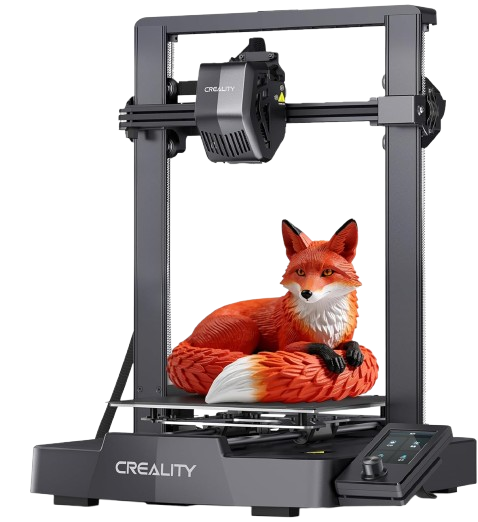
Who it’s for: First-time buyers who want to learn 3D printing without spending a lot
The Ender 3 V3 SE is the answer to “I want to try 3D printing but I don’t want to spend $300+” — and unlike older budget printers that required a lot of tinkering, this one actually delivers a smooth experience out of the box.
Under $200, you get CR Touch auto-leveling, a Sprite direct drive extruder, automatic Z-offset calibration, and speeds up to 250mm/s. Assembly takes about 20–30 minutes, and the screen walks you through setup step by step. The 220 x 220 x 250mm build volume is standard for the category and plenty big for most starter projects.
What sets the V3 SE apart from earlier Ender models isn’t any one feature — it’s the overall polish. Creality clearly designed this to remove the “Ender tinkering phase” that used to be a rite of passage. It still has a huge community behind it, tons of upgrade paths, and compatibility with popular slicers like Cura and PrusaSlicer, so you’re never stuck.
The caveats are minor: no Wi-Fi (files go on an SD card), no filament runout sensor, and real-world speeds are better around 180mm/s than the advertised 250mm/s max. But for the price? Those are easy forgives.
The bottom line: The best entry point into 3D printing in 2026. Approachable, affordable, and backed by one of the biggest communities in the hobby.
Quick Comparison
| Bambu Lab A1 Combo | Flashforge Adventurer 5M | Creality Ender 3 V3 SE | |
|---|---|---|---|
| Price | ~$399 | ~$259 | ~$180 |
| Speed | Up to 500mm/s | Up to 600mm/s | Up to 250mm/s |
| Build Volume | 256 x 256 x 256mm | 220 x 220 x 220mm | 220 x 220 x 250mm |
| Multi-Color | Yes (4 colors) | No | No |
| Enclosed | No | Yes | No |
| Best For | Most buyers | Speed + reliability | True beginners |
So Which One Should You Actually Buy?
If you want the best all-around printer and don’t mind spending $400, get the Bambu Lab A1 Combo. You’ll thank yourself every time multi-color printing kicks in without any setup drama.
If your budget is closer to $250 and you just want a fast, reliable workhorse, the Flashforge Adventurer 5M is an excellent pick — especially if you’re printing in spaces where fumes and noise matter.
And if this is your first printer ever and you’re not sure if 3D printing will stick as a hobby, start with the Creality Ender 3 V3 SE. It’s cheap enough that it’s not a big risk, and good enough that you’ll actually enjoy using it.
Happy printing.